Quickstart Guide
January 2, 2026 • Atanas Tonchev
1. Create Your First Project
Once you have registered and signed in, you should see your (still empty) projects dashboard. Click on 'New project' and name your first ichnos project!
2. Enter your first neumes!
Copy and paste the following text into the editor:
(mode:1)
(base:Pa)

[Lo:peta-oligU][o:apos][I:apos][have:olig][cri:olig-psefD][ied:apos]
[u:apos-antiD-haplD][un:apos-gorgUR][:bare][to:ison][o:apos-gorgUR][o:olig][Thee:olig-klasU]
[:malfa-mpaU]
3. Render
Click the render button. You should soon see a pdf file in the preview window. It should look something like this:
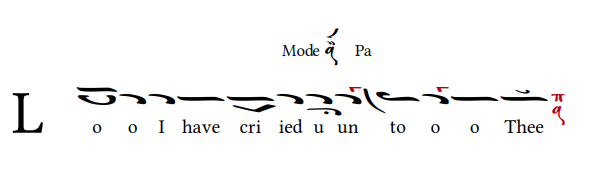
If you want, you can also download it using the export option.